Infrastructure Monitoring Scheme
Hosts are monitored by Zabbix.
Scheme:
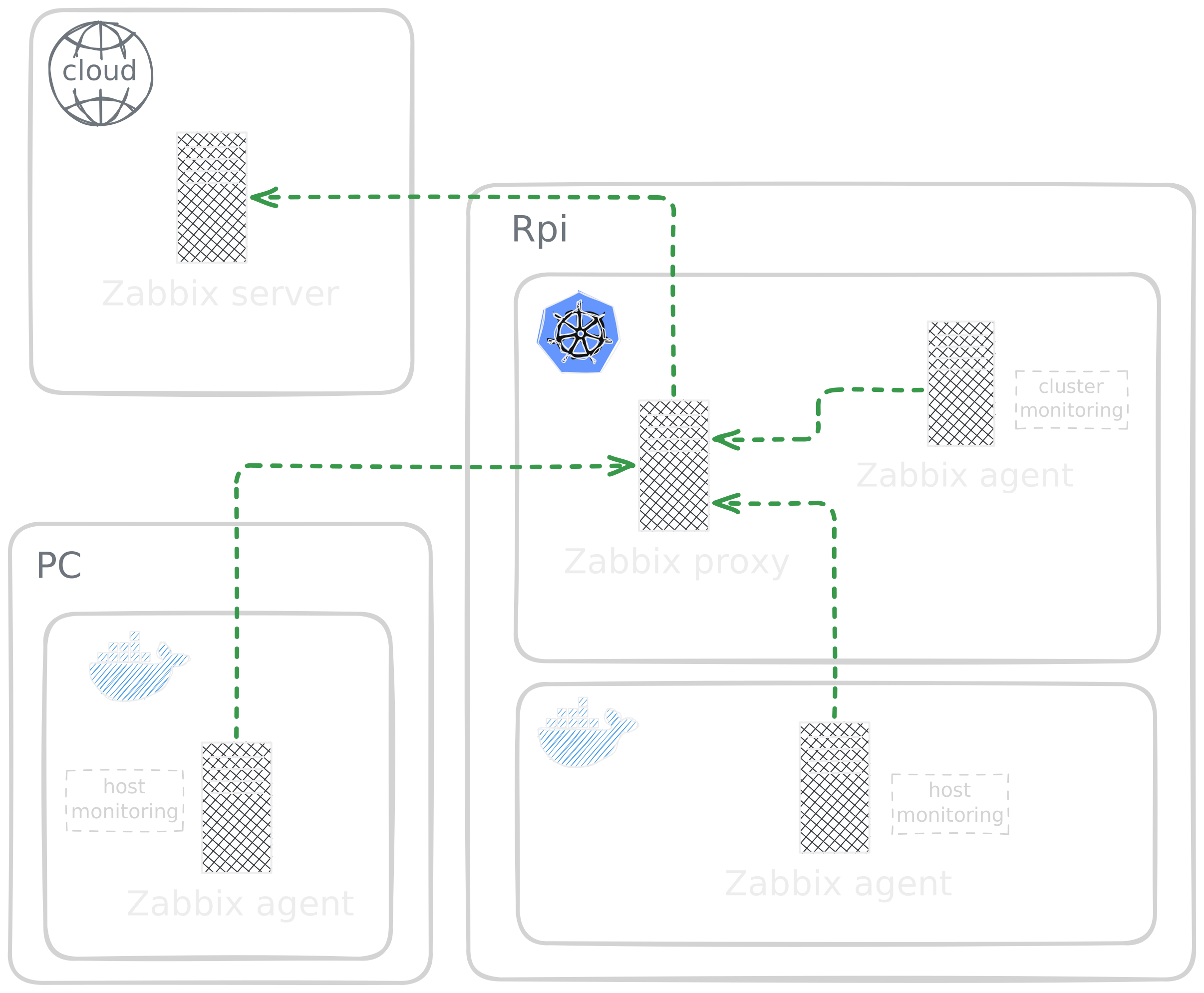
Agent
Active mode: agent requests config and sends metrics to the local Zabbix Proxy instead of directly to the external server. (Avoids exposing agent directly to the internet)
Proxy
Active mode: periodically connects out to the external Zabbix Server to push collected monitoring data. (Reduces direct connections and simplifies firewall and network configuration)
Security and Encryption
Communication between the proxy and the external server is encrypted using TLS with a custom certificate authority. (Both sides can verify each other and protect metrics in transit)
Server
Zabbix server is not part of this project.
note
Server is shared among multiple users. The setup follows agreed-upon conventions for organization and access control.
Access control
Each user maintains two separate accounts with distinct privileges:
- Administrative account (
publowski_admin_role) for system configuration and management - Monitoring account (
publowski) for infrastructure monitoring operations
Proxy configuration
The proxy (zabbix-proxy-publowski) is assigned to a proxy group (publowski-Proxy-Group), enabling load balancing across multiple proxies when needed. Communication between proxy and server is secured using CA-signed certificates unique to each proxy instance.
Host configuration
Host groups and monitoring
Zabbix agents collect metrics from monitored hosts. Each user's hosts belong to a dedicated host group (pp-hosts) for organizational purposes. Hosts are monitored through the proxy group described above.
Alerting configuration
Trigger actions
| Name | Conditions | Operations |
|---|---|---|
Report problems about pp_hosts |
Host group equals pp_hosts |
Send message to user groups: publowski_user_group via all media |
Media configuration
Alerts are delivered through Discord using a webhook integration. The Discord media type is configured in the publowski user profile with:
- Webhook URL configured in the user's Media settings
- Severity levels selected for notification delivery